A focused retail workspace
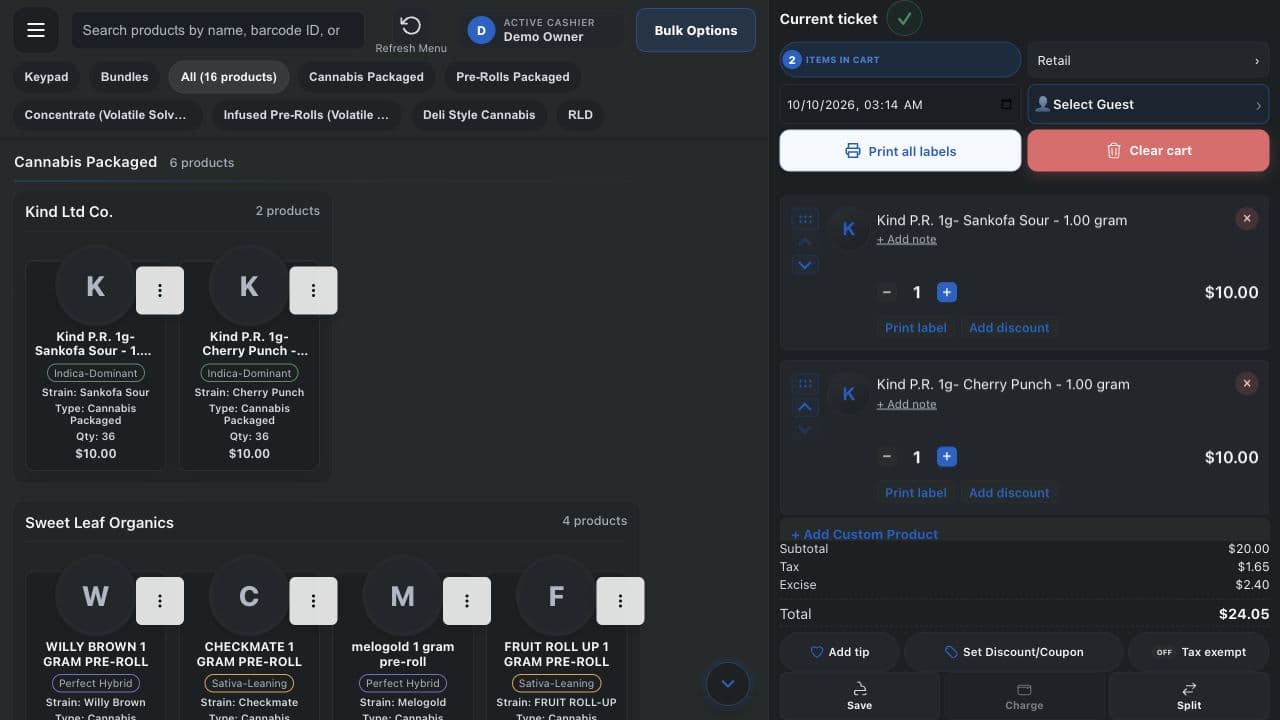
Build a ticket from your cannabis catalog, select the customer and sale context, and keep product details together through checkout.

The center of your operation
Bring checkout, customers, cannabis inventory, labels, and back-office controls into one focused workspace, with hands-on NMS2S setup and direct developer support.
No contracts. Bring your own device. Windows Desktop + Android.
Built for the everyday
Practical features shaped by the work behind the counter and the people doing it.
Build a ticket from your cannabis catalog, select the customer and sale context, and keep product details together through checkout.
Manage cash and configured card payments, discounts, tips, receipts, and split payments from the same workspace.
Connect configured receipt printers and label workflows to the register, with product details available where your team needs them.
Connect a guest to an order and bring customer history and configured loyalty tools into the service experience.
Work with cannabis quantities, weight price tiers, stock rooms, labels, and RLD inventory imports alongside daily retail.
Use reporting, store settings, menu controls, and staff access without stitching together separate systems.
For New Mexico dispensaries
Bring cannabis catalog details, labels, inventory, and NMS2S workflows into your daily operation. Our developer team helps install, configure, train, and troubleshoot your setup.
Explore NMS2S implementationGetting connected
Start with your business type and the Windows Desktop or Android devices you plan to use.
Review the device and peripheral checks, then finish printer, scanner, scale, and drawer verification in the native Cashier app.
Configure your catalog, staff, payments, and routing. Dispensaries also complete their state integration setup.
Built by operators
Start your setup with a developer team that stays close to your operation.
No contracts. Real people.